Share AthleticSB Access
Summary
If someone outside of your account or AthleticLIVE organization needs access to just scoreboard data for a meet, share the meet with their account instead of giving them your login. Great for allowing a broadcast or production company to manage their own scoreboards especially if they often work with multiple timing companies.
Instructions for the AthleticSB Operator
- If you have not done so already, create an account on athletic.net.
- Login to admin.athletic.live with your athletic.net credentials. You can now close the page.
- Contact live@athletic.net for access to AthleticSB.
- Download AthleticSB
- Once the timer gives you access, you can Select the Meet.
- Click here to Learn More about AthleticSB >
Instructions for the Timer
- Go to the admin meet detail page of the AthleticLIVE meet to be shared
- Click the "AthleticSB Access" button
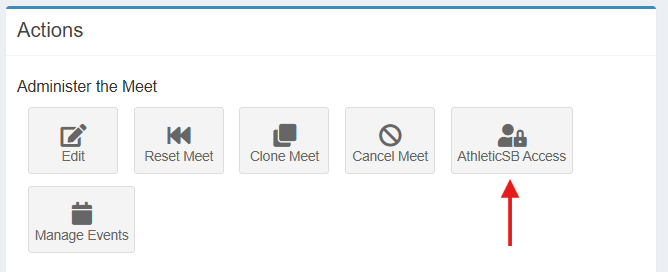
- Click the small blue "+" to add an account by entering an email address, then click submit. Let the operator know they now have access to your meet.
A user must first use their AthleticNET account to login to admin.athletic.live before their email address will be available to share an AthleticLIVE meet with
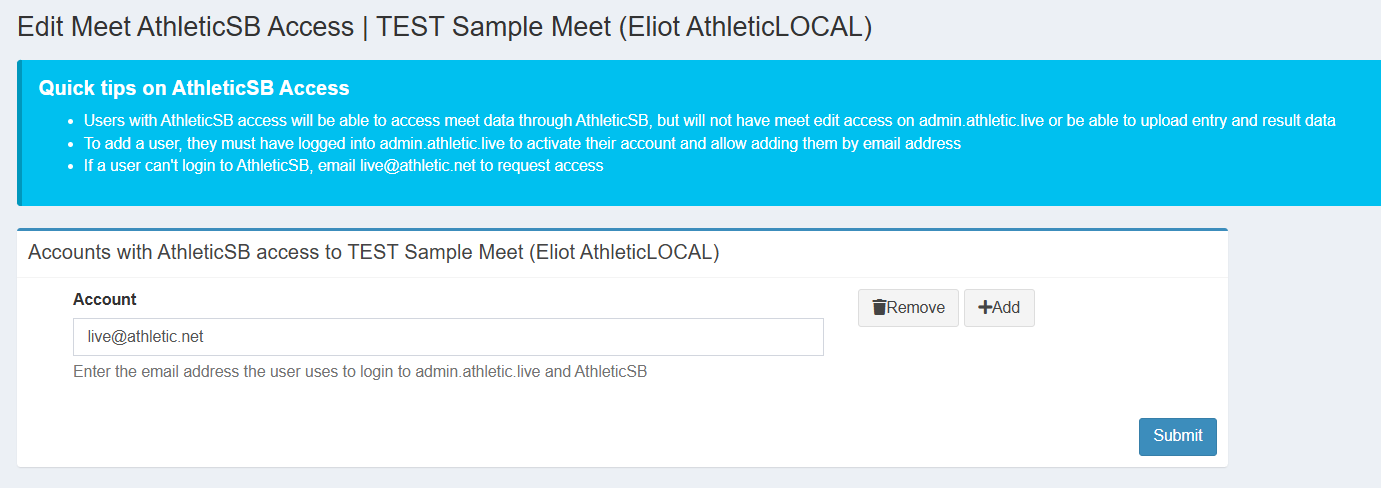
- Accounts can be added or removed at any time by editing the data on this page
