Create Competitor Number System and Import Numbers
Create Competitor Number System
- On the first meet of your series, go to the Settings tab of the Manage Meet page.
- Under "Additional Meet Options," click "Create New System" next to Competitor Number System:
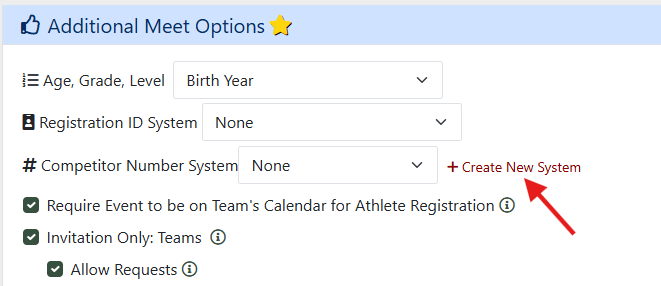
- Enter a name and choose which of your teams should own this system. Keep in mind that systems are probably seasonal, so include the season in the Competitor Number system name.
- Select this new Comp Number system for the rest of your meets.
Import Comp Numbers
If desired, you can preload comp numbers for all athletes via the result uploader.
- Import entries or roster records with Comp Numbers included into the first meet of the season. Use either the HyTek entry format (D & I records) or the Athletic.net Custom Format - TF Template | XC Custom Format.
- Match Division, Teams, Events, and Athletes.
- Click "Add Athletes" after matching all athletes.
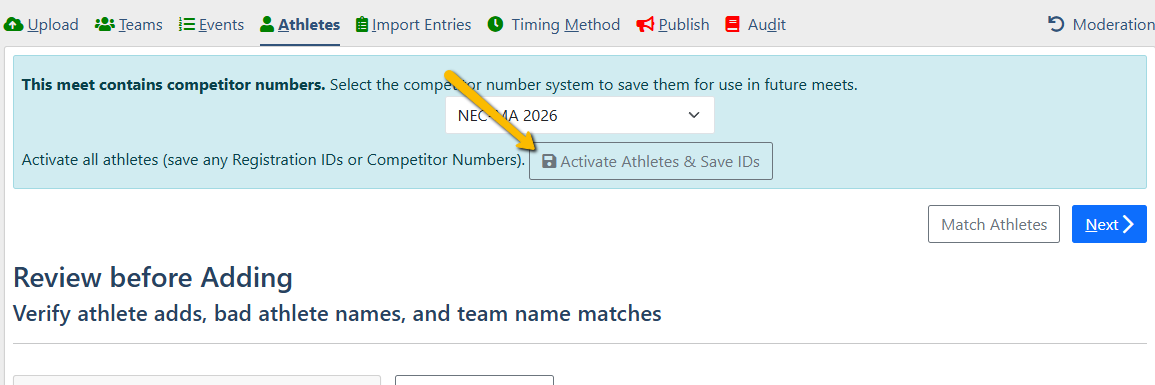
- Click "Activate Athletes and Save IDs" on the Athletes tab:
Use RUNMEET to assign Comp Numbers
Use RunMeet to assign Comp Numbers to all athletes - learn more here.
Persist RUNMEET changes to Comp Number System
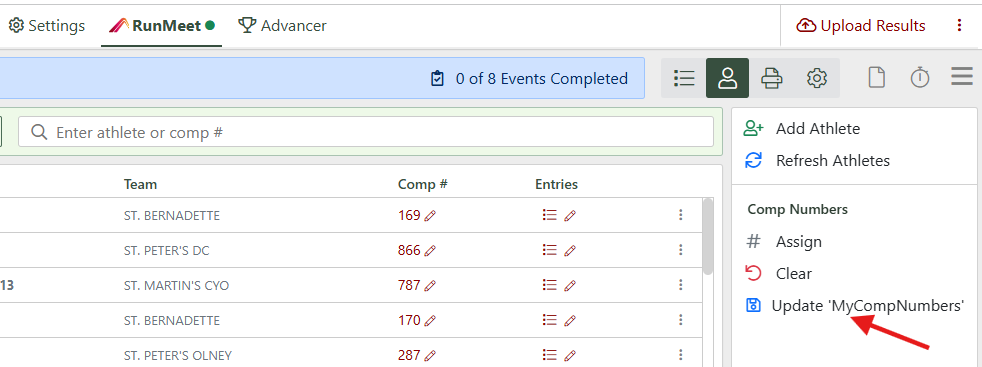
Click Update 'MyCompNumbers' in RunMeet's Athletes screen to sync your changes back to your Competitor Number system: