Configure an FTP Connection with The Race Director
As of October 2022, we prefer the Race Director Direct Upload instead of FTP. Please consider changing your process as FTP uploads will be turned off in 2023.
This article explains how to configure an FTP connection between The Race Director and AthleticLIVE.
In order to upload information from The Race Director to AthleticLIVE, you'll need The Race Director 2018 or a newer version (see Help About Race Director to view your version), and no customizations to your live results HTML (if you don't know what this is, you're fine).
Some T-Mobile hotspot users have reported trouble with FTP connectivity. If you experience difficulty using FTP when using a T-Mobile hotspot, you'll need to use a different network.
From within The Race Director, select Tailor Options from the menu bar, then open the System 2 tab.
Copy the FTP login details from your AthleticLIVE Meet Administration Portal into the FTP fields as follows:
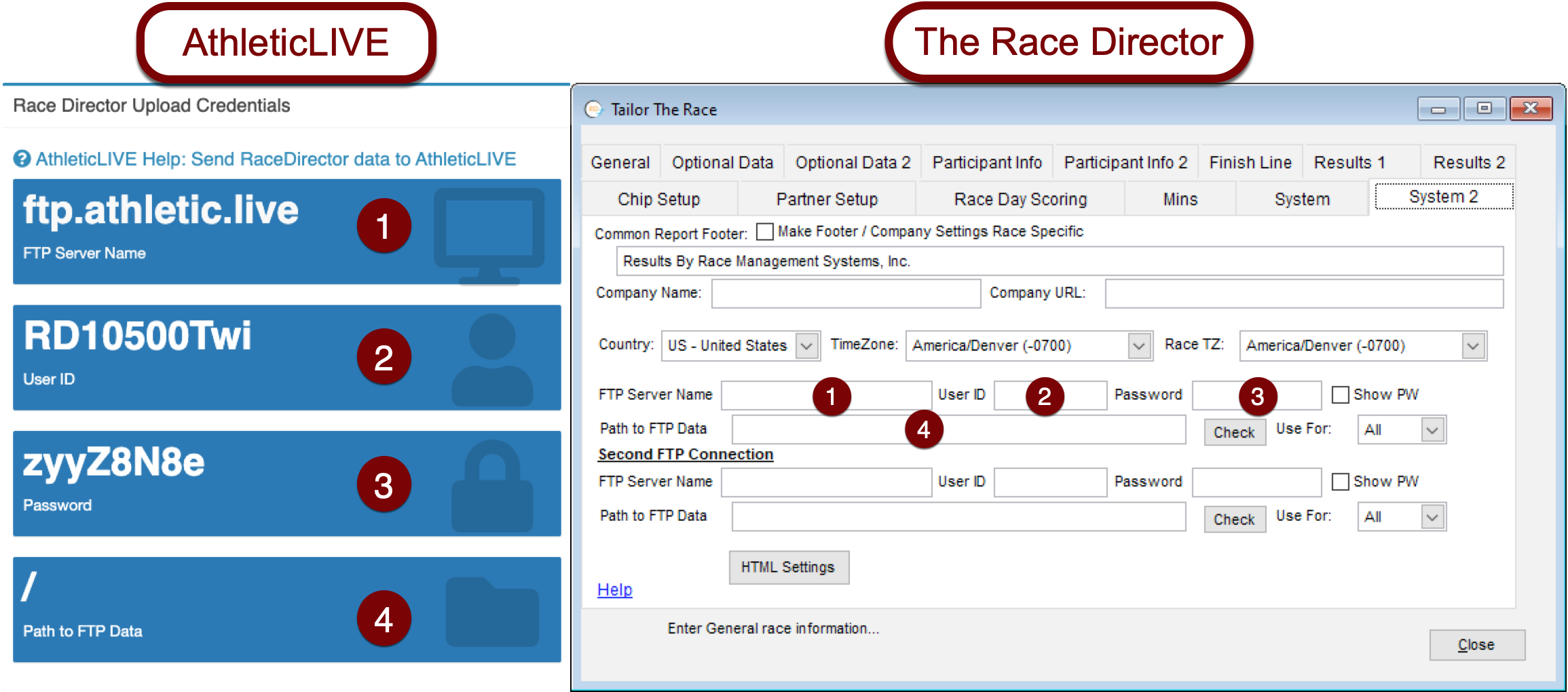
AthleticLOCAL no longer supports passthrough FTP. Please enter the FTP credentials shown on your admin meet details page and consider switching to Direct Upload
Ensure that the Use For: dropdown is set to All.
Click Check, then click Yes. If you have entered your credentials correctly, you will receive a message that says Connection Made. View the contents of the directory? Click No.
Now that FTP is configured, you may proceed to upload data from The Race Director to AthleticLIVE.
